You are on staging β€” this data is not persistent.
πŸŽ‰ Free for families β€” always

All your family's
activities,
in one place.

Martial arts on Tuesdays. Swim meet Saturday. Your own rec league Thursday night. Helperly keeps every schedule β€” for your kids, yourself, or both β€” on one calendar, with automatic reminders so you never re-check a wall.

No credit card required. 2 profiles free, forever.
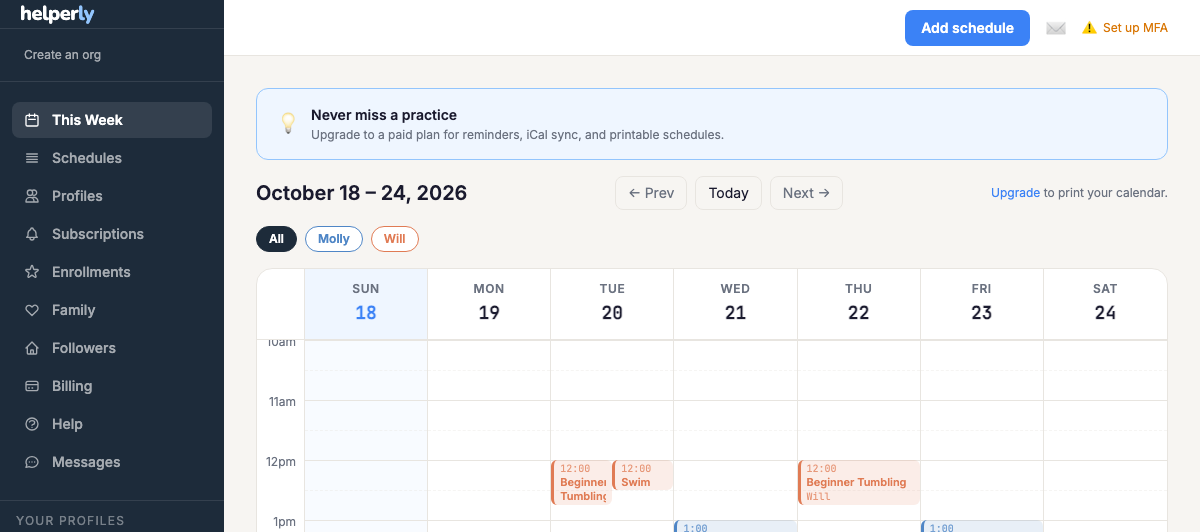
Helperly week calendar showing a family's activities
πŸ‘§
πŸ§‘

Sound familiar?

Managing everyone's activities shouldn't require a spreadsheet, a stack of paper on the fridge, and three group chats.

πŸ“„

The schedule is on a paper flyer at the studio β€” you only know it changed when you show up and it's different.

πŸ“±

Announcements come via email, GroupMe, and a school app. You're checking three places to know what's happening tomorrow.

🧠

You're holding it all in your head. The override schedule for testing week. The themed class this month. The camp field trip Thursday.

How it works

Three steps, five minutes, done for the season.

1

Add a profile

Add a kid, yourself, or both β€” each profile gets a color that follows it across every view so you always know at a glance whose activity is whose.

2

Enter the schedule

Add recurring classes, testing dates, themed monthly events, and camp week themes once. Or scan a QR code if the org is already on Helperly.

3

Get reminded automatically

Helperly reminds you the night before and an hour before, every time β€” including overrides and special events.

Built for how activities actually work

πŸ”„

Override-aware schedules

Testing week replaces regular class β€” Helperly shows the override, not both. No more confusion about what's actually happening.

πŸ‘¨β€πŸ‘©β€πŸ‘§β€πŸ‘¦

Every profile, one view

Color-coded by profile. See everyone's activities β€” kids, yourself, or both β€” in one week view, or filter to just one.

πŸ””

Automatic reminders

Set it once per activity. Helperly fires reminders for every occurrence, including overrides and special events.

πŸ“²

Subscribe via QR code

If your studio is on Helperly, scan their QR code and their schedule appears on your calendar instantly.

πŸ”’

Passkey sign-in

Sign in with Touch ID, Face ID, or a hardware key β€” no password to forget, no phishing risk.

🏫

Works for any activity

Martial arts, swim, gymnastics, camp, soccer, dance, or your own rec league. If it has a recurring schedule with occasional exceptions, Helperly handles it.

πŸ‘¨β€πŸ‘©β€πŸ‘§β€πŸ‘¦

Co-parent access

Invite a co-parent to view and update your family's calendar. Each parent gets their own reminder preferences. Free accounts get 1 co-parent; paid plans get unlimited.

Simple pricing

Free for most families. Upgrade when you're ready.

Free

$0

forever

  • βœ“ Up to 2 profiles
  • βœ“ Up to 4 schedules
  • βœ“ Email reminders
  • βœ“ Public schedule sharing
  • βœ“ Override-aware calendar
  • βœ“ 1 co-parent invite
Get started free
Most popular

Family

$4.99

per month Β· or $39/year, plus tax where applicable

30-day free trial

  • βœ“ Unlimited profiles
  • βœ“ Unlimited schedules
  • βœ“ Email + push reminders
  • βœ“ No ads
  • βœ“ Unlimited co-parents
  • βœ“ Live Google/Apple Calendar sync
  • βœ“ Printable calendars
  • βœ“ Everything in Free
Get started
Are you a studio, camp, or gym? Publish your schedule directly β€” families subscribe via QR code and get automatic updates when you post overrides.

Business

$25

per month Β· or $225/year, plus tax where applicable

60-day free trial

  • βœ“ Publish your schedule directly
  • βœ“ QR-code sharing with automatic override updates
  • βœ“ 3-year chat history
  • βœ“ Your logo on your page
  • βœ“ Printable standing schedule
Claim your org's page β†’ Have an ID from a parent instead of a link?

Frequently asked questions

Why is this better than a normal calendar?

A normal calendar just holds dates β€” it doesn't know when something changes. Helperly connects your organization directly to your families, so when the org updates a practice time, cancels for weather, or adds a special event, it updates automatically on every parent's calendar. No re-checking a whiteboard, no waiting on an email. Parents can also share their β€œliving” calendar with grandparents, babysitters, or teachers, so everyone helping with pickup or drop-off stays on the same page too β€” automatically.

Do parents need to create an account?

Yes, but it's quick β€” parents sign up free, then join your organization with a QR code or link. No app-hopping between different tools for different teams or activities.

What if a family has multiple kids β€” or an adult β€” in multiple activities, or even multiple organizations?

Helperly handles that natively. One family account can follow multiple profiles β€” kids, yourself, or both β€” across multiple activities and organizations, all in a single color-coded calendar β€” no juggling separate calendars or apps per activity.

Is it free for families?

Yes. Families can join and track up to 2 profiles and 4 schedules for free, forever. Paid plans unlock unlimited profiles, schedules, push notifications, and calendar sync for families who need more.

Can we keep using our regular messaging tools alongside Helperly?

You can, but most orgs find they don't need to β€” Helperly's built-in chat covers org-to-family, family-to-org, and even family-to-family messaging, so updates and questions stay in one place instead of scattered across texts, emails, and group chats.

What happens when a schedule changes β€” a snow day, a canceled practice, a special event?

You post the change once in Helperly, and it overrides the regular schedule automatically on every parent's calendar β€” no separate β€œregular schedule” and β€œthis week's changes” for people to reconcile themselves.

Stop checking the wall.

Five minutes to set up. One calendar for everything. Reminders that just work.

Get started β€” it's free

No credit card required.