Switching Between Families
If you have your own profiles and follow another family — or run an organization too — a switcher in the sidebar lets you jump between those contexts without signing out.
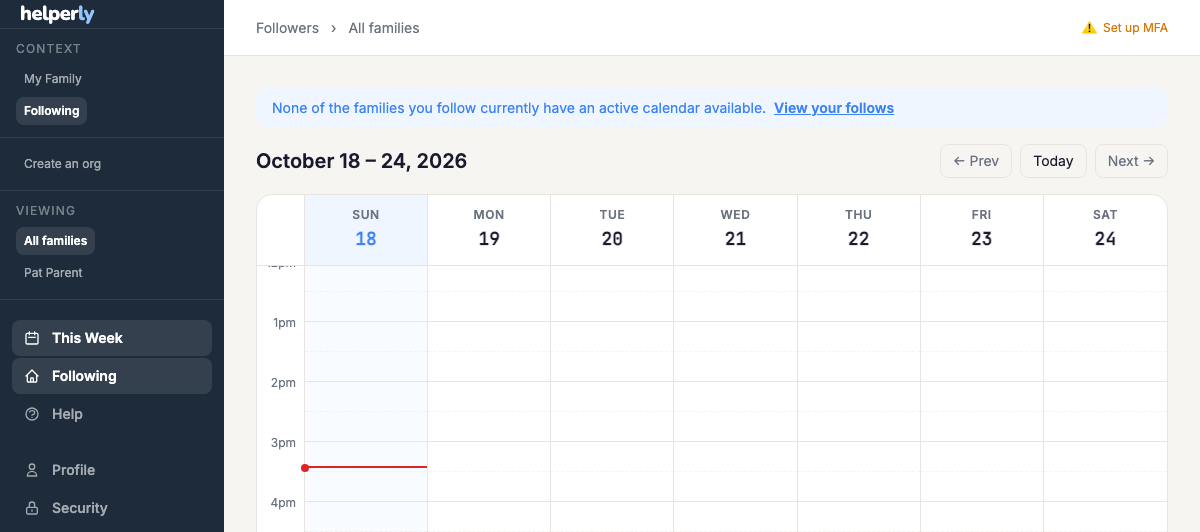
What you'll see
The switcher only shows the contexts that apply to you. If you only have your own profiles, you won't see it at all. Once you're following at least one family (see Family Followers) or you're an org admin, the sidebar gains a switcher listing:
- My Family — your own profiles' calendar and tools.
- Each family you follow, by name, plus "All families" — an aggregate calendar merging every family you follow onto one grid.
- My Organization — your studio/gym's schedule dashboard, if you run one.
Not following anyone yet?
The sidebar shows "Create a parent account" or "Create an org" links wherever they apply, so you can pick up a second context at any time without losing the one you already have.